
The Short Version
A first Polymarket Perps trade takes eleven steps. Check that you are allowed to trade. Activate Perps on your account. Move at least 10 pUSD into the Perps account. Pick a liquid market. Choose long or short. Lower the leverage, because the app starts at the market's maximum. Enter the amount, read the liquidation price and fee, and place the order. Then learn to read the position panel, close the position and withdraw.
The steps below use the labels the app uses. For what Perps is, the full market list and the key numbers, see the Polymarket Perps hub guide.

Before you start
- You live outside the United States, Canada and the other restricted places (Step 1), and you are 18 or older.
- You have a Polymarket account and at least 10 pUSD, or a way to deposit by card or crypto.
- You understand that a leveraged position can be liquidated and that you can lose all the margin you put in.
- You plan to start small. A first trade is for learning the controls, not for making money.
Step 1: Check That You Are Allowed to Trade
Polymarket blocks Perps order placement from the United States, Canada, Cuba, Iran, North Korea, Syria, Crimea, Donetsk and Luhansk (as of November 2026). Polymarket says the list can change.
Perps runs on polymarket.com, and polymarket.com has a longer block list of about 40 countries, including Australia, France, Germany, Italy, Japan, the Netherlands, Singapore, Taiwan and the United Kingdom. Polymarket does not say whether those countries can use Perps. Assume they cannot. Check our country guide for your country.
- Before you trade, the app asks you to confirm that you are not a US person, not located in a restricted place, and not using a VPN.
- Polymarket can ask suspected restricted users for ID or proof of residence and switch the account to close-only. A VPN does not make a restricted country allowed.
- Israel is not on either list as of November 2026. We do not give legal or tax advice. Check your own situation.
Step 2: Activate Perps on Your Account
Log in to Polymarket and open the Perps area. You can open Polymarket Perps here. If Perps is not yet active, you see a card that says "Activate perps on your account to start trading" with a Get started button.
- Click Get started (or Enable / Enable trading).
- Your wallet asks for a signature. Approve it. If you decline, the app shows "Signature request was declined" and you can try again.
- The app asks to switch to Polygon. Approve the switch. Perps deposits and withdrawals settle on Polygon.
There is no ID step in this flow as of November 2026. If the app says your wallet is on a different account, switch to the address it names.
Step 3: Fund the Perps Account with pUSD
Perps uses pUSD (Polymarket USD) as collateral. pUSD is a token on Polygon backed by USDC. For you it works like dollars: you load funds, see a balance, trade and withdraw. Our pUSD guide explains the token.
The Perps balance is separate from your Predictions cash. After activation, a "Welcome to Perps" window offers two ways to fund it:
| Option | What it does | When to use it |
|---|---|---|
| Transfer from Predictions (marked "Fastest") | Moves pUSD you already have on Polymarket into the Perps account. The window shows your available Predictions cash | You already have a Polymarket balance |
| Make a new deposit (via card or crypto) | Adds new money | Your Polymarket balance is empty. See our deposit guide for methods |
- The minimum Perps deposit is 10 pUSD.
- Deposits move pUSD from your Polymarket wallet into the Perps exchange contract on Polygon.
- The order ticket also has Transfer and Deposit buttons for adding more later.
Step 4: Pick a Market
The market selector groups markets as Stocks, Crypto, Indices, Commodities and Pre-IPO, with a Watchlist. You can search and sort by Price, 24h change, Volume, Leverage, Open interest and Funding.
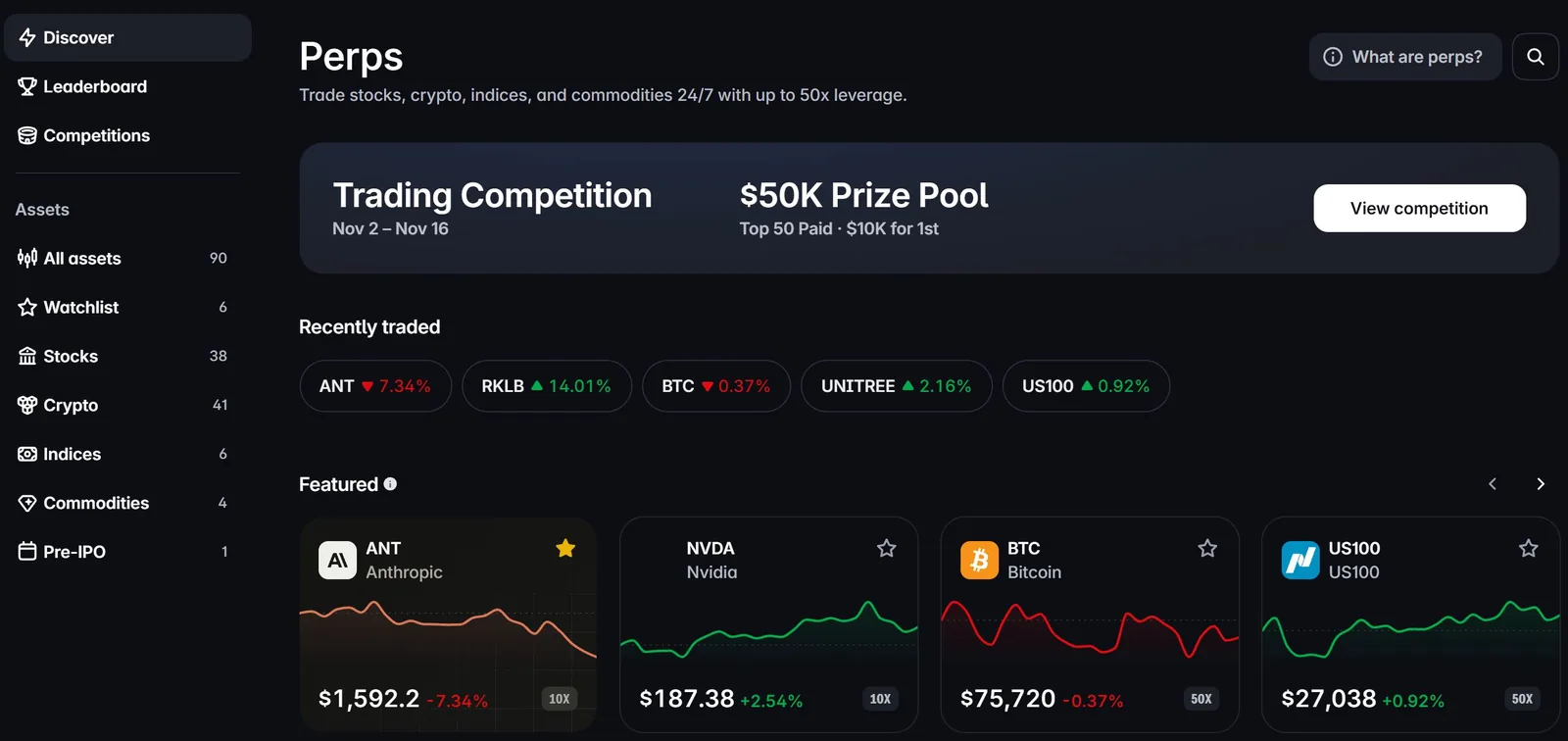
Pick a market from the Perps page. Each card shows the price, the 24h change and the maximum leverage (10X, 50X).
For a first trade, pick a liquid market. On 6 November 2026 the largest markets by 24h volume were US100 (Nasdaq 100), BTC, USA500 (S&P 500), ETH, WTIOIL and GOOGL. Several small coins traded under $50,000 in 24 hours. In a thin market, a market order can fill well away from the price you see.
When you open a market, the header shows three numbers you should read before trading:
- Mark: the price used for your PnL, margin, liquidation and TP/SL triggers.
- Oracle: Polymarket's estimate of the real asset's price, from external feeds.
- Funding: the current hourly rate and a countdown to the next payment, on the hour.
You can open the BTC perp to see these numbers on a deep market.
Stocks trade 24/7 here. Outside normal market hours their prices come from fewer external feeds.
Step 5: Choose Long or Short
The order ticket has two directions: Long and Short.
| Direction | You profit when | PnL formula | Example: 0.001 BTC, entry $100,000 |
|---|---|---|---|
| Long | The mark price goes up | Size x (Mark minus Entry) | Mark $105,000: 0.001 x $5,000 = +$5.00 |
| Short | The mark price goes down | Size x (Entry minus Mark) | Mark $95,000: 0.001 x $5,000 = +$5.00 |
Prices in these examples are round numbers for the math, not current prices. Funding also depends on direction: when the rate is positive, longs pay shorts. When it is negative, shorts pay longs.
Step 6: Set Margin Type and Leverage
Open Order settings in the ticket.
Margin type
- Isolated: "Funds for this position only". If this position is liquidated, only its own margin is used. This is the default.
- Cross: "Shared funds across positions". A liquidation can unwind the whole cross account. Polymarket's docs say cross is opt-in through the API, so the app's Cross option may not be available on every account or market.
Use isolated for your first trades. You cannot change the margin type while you have an open position or open orders in that market.
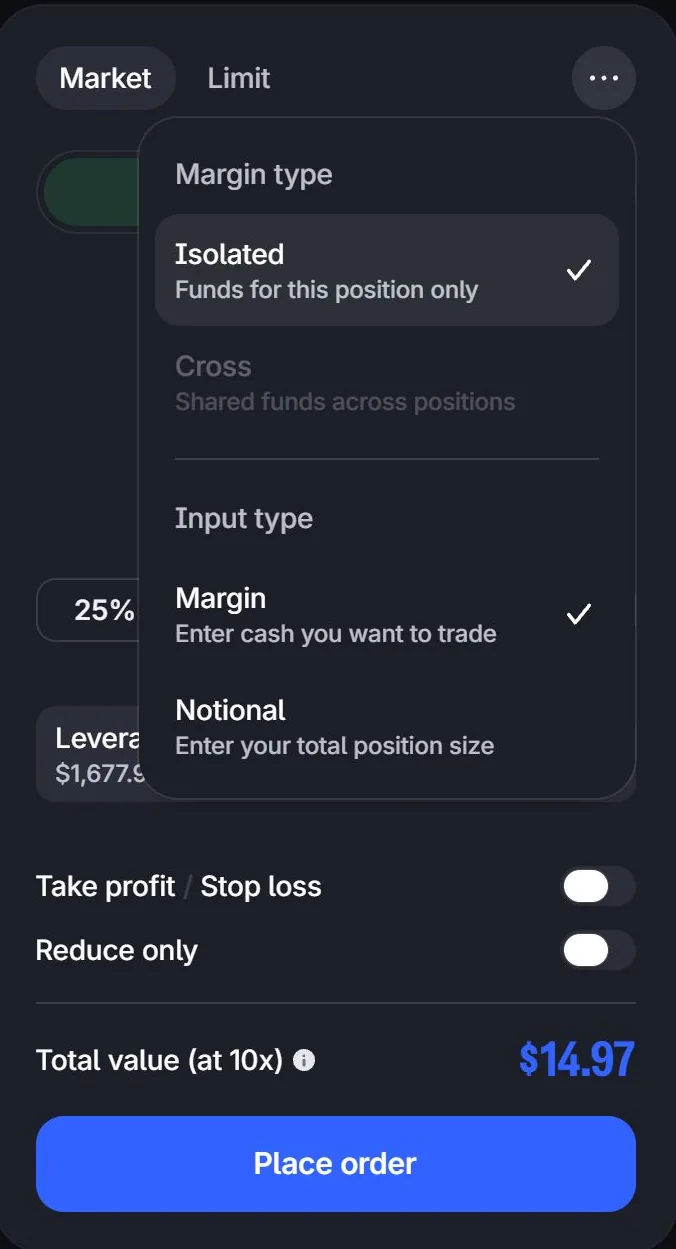
The three-dot menu on the order ticket. On ANT in November 2026 only Isolated was available; Cross was greyed out. Input type switches between margin and notional size.
Leverage
The app sets leverage to the market's maximum unless you change it. That is 50x on BTC, ETH, USA500 and US100, 20x on gold, silver, oil and some coins, and 10x on stocks. For a first trade, lower it before anything else.
| Leverage on a 50x market (maintenance 1%) | Margin for a $100 position | Adverse move to liquidation (about) |
|---|---|---|
| 50x | $2 | 1/50 minus 1% = 1% |
| 10x | $10 | 1/10 minus 1% = 9% |
| 5x | $20 | 1/5 minus 1% = 19% |
| 2x | $50 | 1/2 minus 1% = 49% |
These distances ignore fees and funding. The maintenance rate is 0.5 divided by the market's max leverage, so it is 2.5% on a 20x market and 5% on a 10x market. Leverage caps also step down as a position grows, but that only matters above about $250,000 notional. Our leverage and liquidation guide has the full rules.
Step 7: Enter the Amount and Read the Breakdown
The Amount box can be in two units. Use Input type to switch:
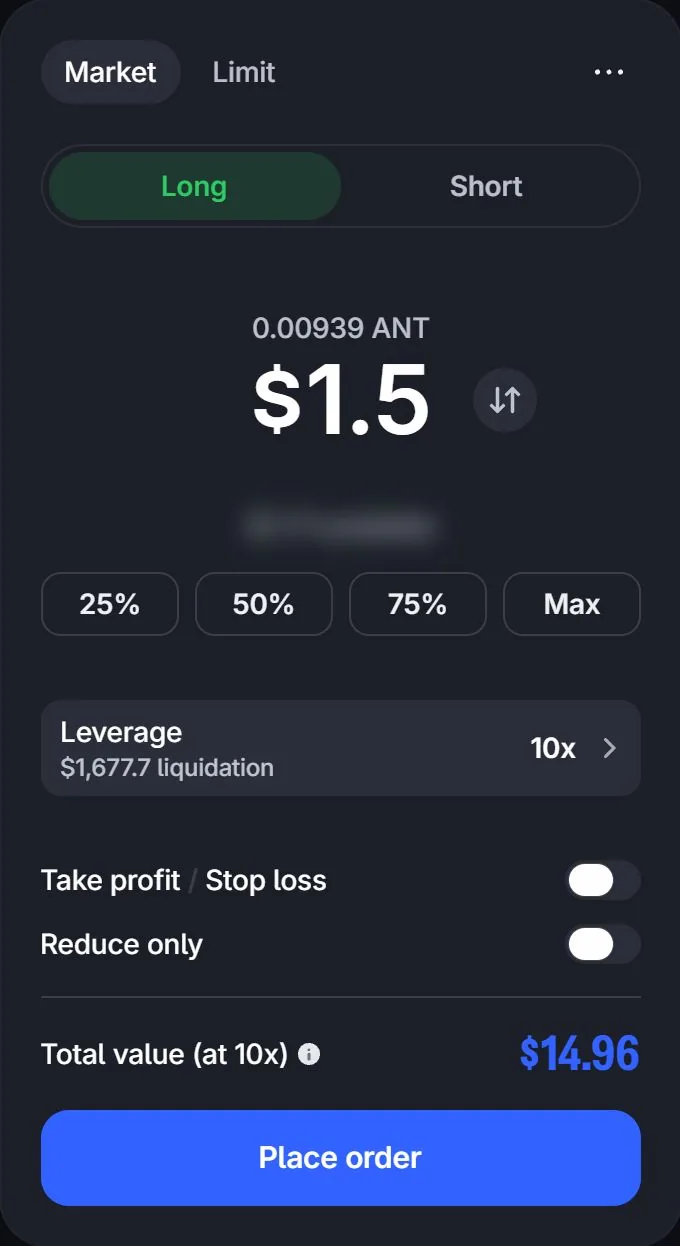
A filled ticket before sending: $1.5 of margin at 10x controls $14.96 of ANT. The leverage row shows the liquidation price before you place the order. We did not place this order.
- Margin: "Enter cash you want to trade". $50 at 2x opens a $100 position.
- Notional: "Enter your total position size". $100 opens a $100 position, and the margin is $100 divided by your leverage.
Mixing these up is a common beginner error. Check which unit is active. The minimum order is $10 notional.
Before you click Place order, read the Order breakdown:
| Line | What it tells you |
|---|---|
| Margin cost | The pUSD that this order locks as margin |
| Total value | The position notional, at your leverage |
| Liquidation price | Where the position would be liquidated. If it is close to the current price, lower the leverage |
| Est. fee | The trading fee for this order |
If you see "Not enough margin", lower the size, lower the leverage or add funds.
Step 8: Choose the Order Type
| Order type | What it does | Notes |
|---|---|---|
| Market | Fills now against the order book | Pays the taker fee (0.040% at the base tier). In thin markets it can fill far from the mark price |
| Limit | Waits in the book at your price | The Mid button fills in the mid price. If it rests in the book and fills later, it pays the maker fee (0.0125% at the base tier). Prices too far from the mark are refused with "Price is too far from the market": the band is about 2% for indices and 5% for other markets |
| Take profit (TP) | Closes the position when the mark price reaches your target | For a long, the TP price must be above entry. For a short, below. You can set it as a price, a percentage or a dollar gain |
| Stop loss (SL) | Closes the position when the mark price reaches your limit | For a long, below entry. For a short, above. Triggers on the mark price, not the last trade |
| Reduce only | The order can only shrink an open position, never increase it | Needs an open position in that market. Choose the opposite side to reduce. Cannot be on together with TP/SL in the same ticket |
| Close / Market close | Closes all or part of a position | See Step 10 |
Fee example at the base tier: a $100 market order costs $100 x 0.04% = $0.04. A $10,000 market order costs $4.00. Fees fall as your 30-day volume grows. ANT pays half. Funding is a separate cost, paid every hour. See our funding rates and fees guide.
Worked Example: The Same $50, Two Leverage Settings
You transfer 100 pUSD from Predictions. You want a $50-margin long on BTC. For easy math, BTC is at $100,000 (an example price, not a current one). BTC is a 50x market, so the maintenance rate is 1%.
- Notional: $50 x 50 = $2,500. Size: $2,500 / $100,000 = 0.025 BTC
- Opening fee (market order): $2,500 x 0.04% = $1.00
- Maintenance margin: $2,500 x 1% = $25
- Liquidation: equity falls from $50 to $25 after a $25 loss. 0.025 BTC x $1,000 = $25, so a drop of $1,000 (1%) to about $99,000 liquidates you
- If liquidated, the 0.5% liquidation fee alone is about $2,475 x 0.5% = $12.38, so most of the $50 is gone
- Withdrawal: the reserve is the larger of $50 (margin) and 10% x $2,500 = $250. That is more than your $100, so you can withdraw nothing while the position is open
- Notional: $50 x 2 = $100. Size: $100 / $100,000 = 0.001 BTC
- Opening fee: $100 x 0.04% = $0.04
- Maintenance margin: $100 x 1% = $1
- Liquidation: equity falls from $50 to $1 after a $49 loss. 0.001 BTC x $49,000 = $49, so the price must fall about 49% to about $51,000
- Withdrawal: the reserve is the larger of $50 and 10% x $100 = $10, so $50. You can withdraw about $100 minus $50 minus $0.04 = $49.96
- If BTC rises 5% to $105,000 and you close after 24 hours: PnL 0.001 x $5,000 = +$5.00. Closing fee $105 x 0.04% = $0.042. Funding at the crypto baseline rate of 0.00125% per hour: $100 x 0.00125% x 24 = $0.03. Net: $5.00 minus $0.04 minus $0.042 minus $0.03 = about +$4.89, or about 9.8% of the $50 margin
- If BTC falls 5% to $95,000 instead: PnL minus $5.00. Closing fee $95 x 0.04% = $0.038. Net: minus $5.00 minus $0.04 minus $0.038 minus $0.03 = about minus $5.11
The liquidation prices above are estimates. The app shows the exact figure, which can differ slightly because maintenance margin is measured at the current mark price and fees and funding are taken from equity. The lesson does not change: at 50x, a normal 1% move ends the trade. At 2x, the same $50 survives large moves, and the 5% move costs or earns $5.
Step 9: Read the Position Panel
After the order fills, the position appears under Positions.

A real ANT short at 10x on our own account: entry $1,600.7, liquidation price $1,676.9 (about 4.8% above entry), margin shown in the Margin column, funding paid so far in the last column.
| Column | Meaning |
|---|---|
| Asset / Side | The market, and long or short |
| Size | How many units you hold, for example 0.001 BTC |
| Position value | Size times the current price |
| Entry | Your average entry price |
| Now | The current price |
| Liq price | Where the position is liquidated. Watch the gap between Now and Liq price |
| Margin | The collateral backing the position |
| P&L | Unrealized profit or loss at the mark price |
| Funding | Funding paid or received on this position |
| TP / SL | Your take-profit and stop-loss levels. Use Add or Edit TP/SL to change them |
From the position you can also:
- Adjust leverage: the size stays the same, but margin and liquidation price change. Lowering leverage needs more margin, so the app may ask you to add or transfer funds.
- Adjust margin (isolated): add margin to move the liquidation price away, or remove margin to free funds. The window shows the estimated new liquidation price.
Your account is always in one of three states. Healthy: equity is at or above initial margin, normal trading. Margin call: equity is below initial margin but above maintenance margin. You can only reduce the position or deposit. Liquidation: equity is below maintenance margin and the system closes the position. A deposit during a margin call can restore a healthy state at once.
Step 10: Close the Position
- In the Positions list, click Close on the position.
- Choose the amount: a size, or a percentage of the position. You can close part of it.
- Choose Market close to exit now, or set a Limit price to exit at a set price.
- Check Est closed P&L and Order value, then click Place order.
- A closing order pays the trading fee like any other fill.
- "Not enough liquidity to close position" means the book is too thin for a market close of that size. Close in smaller parts or use a limit price.
- "Your open orders already cover this position" means resting orders already close it. Cancel them first or set a better price.
- Close all closes every open position at market price. The app warns that this cannot be undone.
Step 11: Withdraw
Withdrawals move available pUSD from the Perps account back to your Polymarket wallet. From there, normal Polymarket withdrawals apply. See our withdrawal guide.
The 10% rule
While positions are open, a withdrawal must leave the larger of two amounts in the account:
- the collateral already reserved for positions and open orders, or
- 10% of the total value of all open positions at the mark price.
Example from Polymarket's docs: a $100 position at 20x needs $5 of initial margin. The withdrawal reserve is the larger of $5 and 10% x $100 = $10, so $10. With $20 of collateral, $10 can be withdrawn. Above 10x leverage, the 10% floor is stricter than the margin. At 10x or below, the margin already covers it.
Close your positions and cancel open orders if you want to withdraw everything. Since 5 November 2026, accounts enrolled in the withdrawal address book can withdraw only to addresses in that book.
Common Beginner Mistakes
- Leaving leverage at the default. The app starts at the market maximum, up to 50x. At 50x a 1% move liquidates you.
- Confusing margin and notional input. $100 as margin at 10x is a $1,000 position. $100 as notional is a $100 position.
- Not reading the liquidation price. It is in the order breakdown before you click. Read it every time.
- No stop loss. Perps trade 24/7. A position can move while you sleep. Set an SL, and remember it triggers on the mark price.
- Market orders in thin markets. In markets with low 24h volume, use limit orders and small sizes.
- Forgetting funding. Funding is paid every hour, also on weekends. A long position at the crypto baseline rate pays about 0.03% of notional per day, and the rate can rise sharply.
- Expecting to withdraw everything. At least 10% of open position value stays locked until you close.
- Trying to switch margin type mid-trade. You must close the position and cancel orders in that market first.
- Using a VPN from a restricted country. It breaks the terms, and the account can be set to close-only.
When you are ready, go to Polymarket Perps and repeat the steps above with a small amount.
Perps Guides
The full Polymarket Perps series
- Polymarket Perps: the complete guide: what Perps is, all 90 markets, key numbers, who can use it, risks and competitions.
- Perps leverage and liquidation: leverage caps, isolated vs cross, liquidation price examples, the insurance fund and auto-deleveraging.
- Perps funding rates and fees: hourly funding, mark vs oracle price, fee tiers and holding costs.
- The ANT (Anthropic) pre-IPO perp: what it is and what is still unconfirmed.
- Build a Polymarket Perps trading bot: the Perps API, SDKs and risk controls in code.